
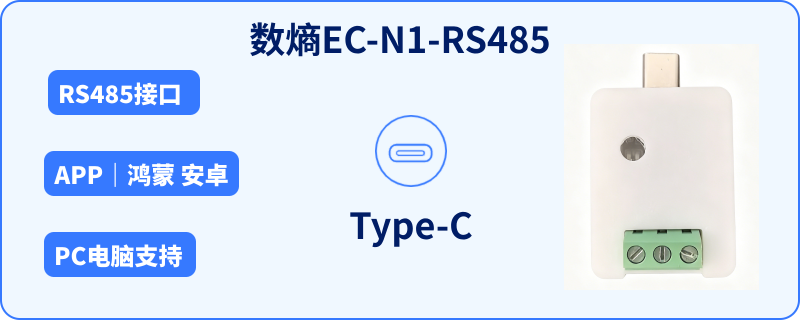
edatahub EC-N1-RS485
The edatahub EC-N1-RS485 portable serial debugger from Wuhan Shuentropy Technology Co., Ltd. drives the mobilization and digitalization of industrial debugging. The device supports the RS485 communication interface — a portable solution built for on-site industrial debugging.
The edatahub EC-N1-RS485 is a portable serial debugger with an RS485 communication interface, built for on-site industrial debugging. Connect it to your phone over USB-C/OTG (USB Serial) to run Modbus RTU debugging without a PC — ideal for on-site inspection and troubleshooting.
Which debugging scenarios suit the edatahub EC-N1-RS485?
On-site debugging with a single RS485 interface: Modbus RTU register read/write, parameter inspection, and troubleshooting — ideal for budget-conscious O&M scenarios with simple interface needs.
App only (the WeChat mini program interface is not linked, so it is not supported). Supports HarmonyOS and Android mobile systems — please log in before using the app. When plugged into a Type-C port on a PC, the device is recognized as a COM serial port, and any serial software on the PC works with it normally.
HarmonyOS app
Pure HarmonyOS: search for "ShangLing" in the app store
How does the EC-N1-RS485 connect to a phone?
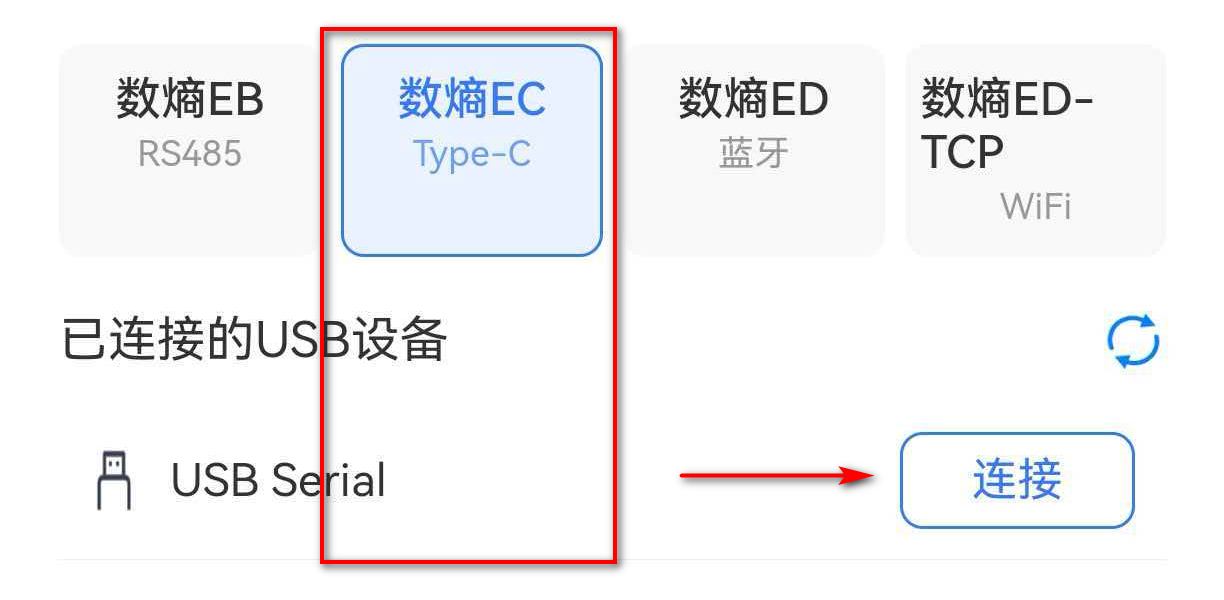
Connect the EC-N1 to your phone over USB-C/OTG; once the ShangLing app recognizes the USB Serial port, select serial parameters and transparent debugging is ready. Wire RS485 into the slave bus — no PC required.
Device preparation: make sure OTG is enabled on your Android phone (Settings - Connected devices - USB, enable OTG / File transfer mode). HarmonyOS phones have it on by default; on Android phones it varies by model — most require manual enabling, and it often turns itself off again. Hardware connection: insert the Type-C plug of the edatahub EC-N1-RS485 into the phone's Type-C port. Note the RS485 terminal definitions: A is positive, B is negative, and GND is the common ground. Connect them to the corresponding terminals of the external RS485 device. Never reverse the A/B wires, or communication will fail. This product belongs to the edatahub EC series — connect it under the edatahub EC entry.
Which ShangLing app features work with the EC-N1?
All four core features — serial debugging, serial monitoring, slave search, and Modbus master — are available, with HEX/ASCII transmission and log export.
Supports serial communication protocols including Modbus master, Modbus slave, serial messaging, slave monitoring, DL645-2007, and CJ188. To adapt other serial protocols, contact our technical team (WeChat: edatahub-cn).
How do I run Modbus master debugging on the EC-N1-RS485?
In the ShangLing Modbus master page, set the serial parameters and slave address, then choose a function code to read/write registers for polling debugging — with logs and snapshots to record data.
How do I contact edatahub for custom features?
Submit custom development requests via the edatahub.cn website. We can build dedicated debugging tools for your device protocols and support onboarding communication protocols onto the edatahub OS data platform.
We can build a dedicated phone debugging tool for your hardware, enabling efficient debugging and maintenance of your devices.
FAQ
What is the difference between the edatahub EC-N1-RS485 and the ED-N2-RS485?
Both are portable serial debuggers with different connection methods: the EC-N1-RS485 connects to your phone over USB-C/OTG (USB Serial) and targets lightweight debugging with a single RS485 interface, while the ED-N2-RS485 connects over BLE Bluetooth and supports both RS485 and TTL interfaces, fitting devices at more logic levels.
Can the EC-N1-RS485 debug Modbus RTU devices?
Yes. Connect the EC-N1-RS485 to your phone over USB-C/OTG; once the ShangLing app recognizes the USB Serial port, you can read/write registers, inspect parameters, and troubleshoot Modbus RTU slaves — no PC required.
What is the battery life and charging method of the EC-N1-RS485?
Built-in rechargeable battery: a full charge covers a full day of on-site debugging, charged via the Type-C port. Connect to the ShangLing app to run Modbus debugging and inspection on RS485 slaves.