
PV/Storage Inverter Slave Simulation · Four-Capability Communication Testing
EcosystemBuilt on the edatahub ED-N2-RS485 Bluetooth serial debugger, a phone app hosts a virtual PV/storage inverter slave — full-link joint commissioning of the four-capability communication system, data monitoring and remote-control verification, all without a real prototype.
Built on the edatahub ED-N2-RS485 Bluetooth serial debugger, a phone app hosts a virtual Modbus slave of a PV/storage inverter — completing full-link commissioning checks of the four-capability communication system (data monitoring, parameter configuration, remote control) without a real prototype.
Why does four-capability commissioning of PV/storage projects need a virtual inverter slave?
With the edatahub ED-N2-RS485 Bluetooth serial debugger, a phone app can act as a virtual PV/storage inverter slave — standing up an RS485 four-capability link and verifying data monitoring and remote control without a real prototype.
This case targets four-capability communication commissioning for PV and storage projects, using the edatahub ED-N2-RS485 secondary-development capability to simulate a virtual inverter slave on a phone.
This case targets four-capability communication commissioning for PV and storage projects. Built on the secondary-development capability of the edatahub ED-N2-RS485 Bluetooth-to-RS485 industrial module, it simulates a virtual inverter slave on a phone. Without a real inverter prototype you can stand up a complete RS485 link and verify the full function set of the four-capability communication system — data monitoring, parameter configuration and remote control — solving the classic pains of scarce commissioning prototypes, hard-to-reproduce fault scenarios and low efficiency.
The whole workflow runs on a phone for portability and speed; it speaks standard Modbus RTU and quickly completes gateway-to-platform integration checks, covering pre-deployment joint commissioning, on-site troubleshooting and acceptance testing.
Which hardware and software build the communication link?
Core hardware is the edatahub ED-N2-RS485 Bluetooth serial debugger; paired with the inverter-slave simulation app and the four-capability master, a complete link is built over Modbus RTU.
Core hardware is the edatahub ED-N2-RS485 industrial Bluetooth serial debugger; on the software side, the secondary-development app and the four-capability communication master.
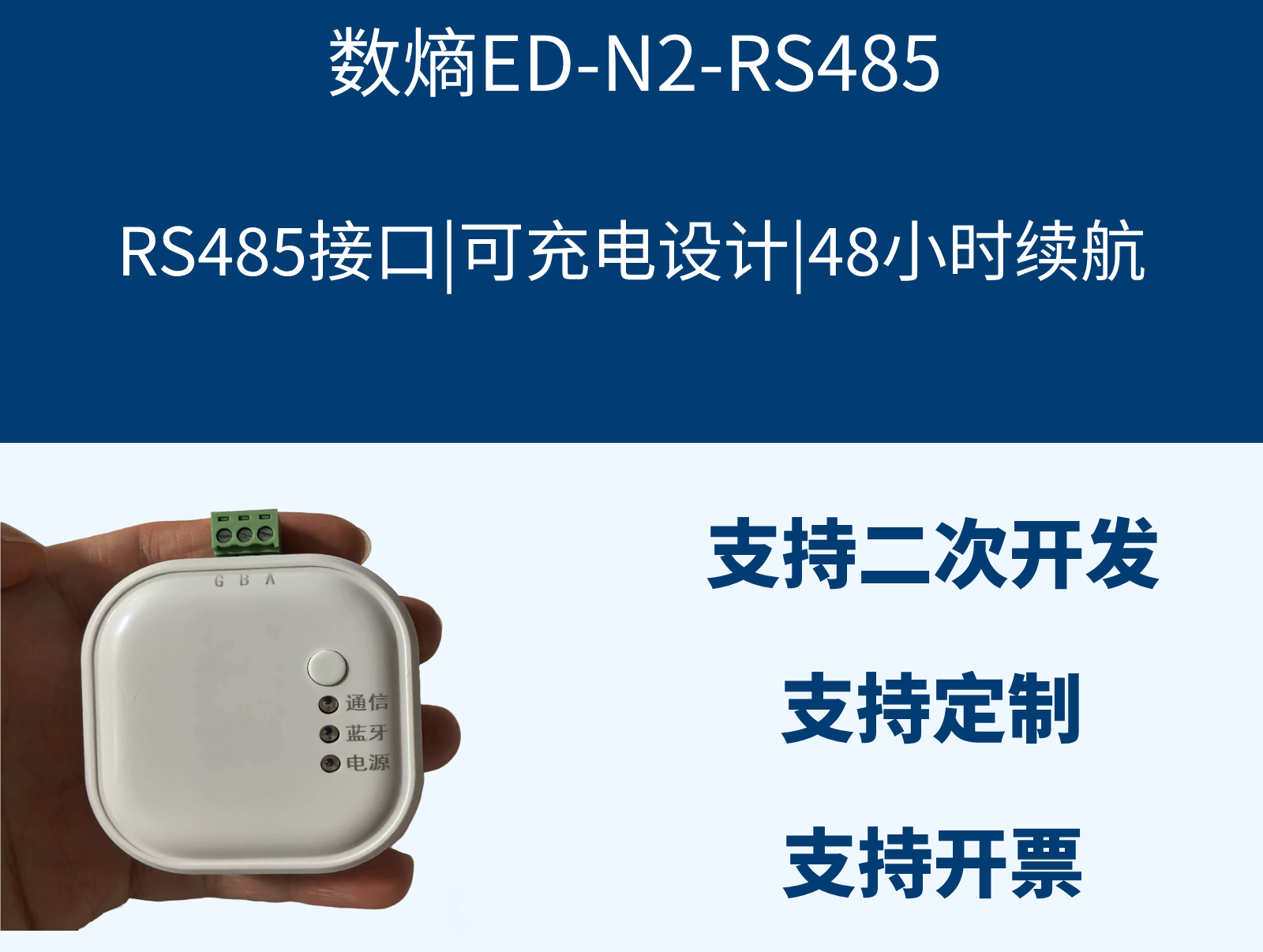
Core hardware: edatahub ED-N2-RS485
An industrial Bluetooth serial debugger from Wuhan Shuentropy Technology Co., Ltd. It supports secondary development and Modbus master/slave switching, has a built-in lithium battery for 48-hour standalone operation, covers the full baud-rate range, speaks standard Modbus, and captures and parses frames out of the box — the core device for lightweight industrial debugging.
Software environment
Mobile: the edatahub ED-N2-RS485 secondary-development documentation and companion app, supporting inverter slave simulation, custom registers, frame monitoring and device-state switching. Master: the four-capability communication system (collection gateway / cloud platform) acts as the Modbus master issuing read/write and control commands.
What hurts in traditional inverter commissioning, and how does the edatahub ED solution fix it?
Traditional commissioning depends on real inverters, PCs and complex wiring — prototypes are scarce and faults hard to reproduce. The edatahub ED-N2-RS485 solution replaces the real unit with a phone-app virtual slave: low cost, highly portable, endlessly repeatable.
Before a four-capability system connects an inverter, two core capabilities must be verified — data monitoring and device control; the traditional way depends on real units, PCs and wired setups, with three pain points.
Commissioning requirements
Before a four-capability communication system connects an inverter, full-link commissioning must verify two core capabilities: first, data monitoring — accurately acquiring inverter voltage, current, power and operating status; second, device control — remote configuration and control such as start, stop, power limiting and fault reset.
Traditional commissioning pains
- Depends on real prototypes: long cycles, high cost, no pre-commissioning in early phases;
- Requires a PC: tedious wiring, poor on-site portability;
- Edge cases and faults are hard to reproduce repeatedly, making protocol troubleshooting slow.
The solution
Leveraging ED-N2-RS485 secondary development, a phone app hosts a virtual inverter Modbus slave that replaces the real unit on the RS485 bus, establishing a complete link with the four-capability master and simulating real-unit interaction across all scenarios to finish every commissioning check.
How does the phone simulate an inverter slave and talk to the four-capability master?
The four-capability master connects over the RS485 bus to the ED-N2 module, which transparently bridges Bluetooth to the virtual slave in the phone app; downlink commands and uplink monitoring data flow both ways with fully transparent frames.
The four-capability master, RS485 bus, ED-N2 Bluetooth module and phone app together form a transparent transmission link — control flows down, monitoring flows up.
Link topology
Four-capability communication master (gateway/platform) → RS485 bus → edatahub ED-N2-RS485 module → Bluetooth wireless → phone app (virtual inverter slave)
How the link works
- Downlink control: the master issues a command; it travels over the RS485 bus and the ED-N2 module's Bluetooth transparent transmission to the phone app, where the virtual slave parses and responds;
- Uplink monitoring: the app simulates inverter operating data and status, sends it back over Bluetooth to the module, which converts it to RS485 signals for the master — data monitoring achieved;
- End-to-end transparency: frames are fully inspectable, with no packet loss or added latency — faithfully replicating real-unit communication.
What are the on-site steps for parameter configuration and state simulation?
On site, deploy the ED-N2 module onto the RS485 bus, connect over Bluetooth and match serial parameters in the app, then enable inverter slave simulation with telemetry data and operating states — ready for joint commissioning with the four-capability master.
After hardware deployment, the phone app completes three steps: Bluetooth connection, serial parameter adaptation, and inverter-slave simulation with data/state configuration.
Hardware deployment
- Power on the ED-N2-RS485 module — the built-in lithium battery supplies it standalone, no external power needed;
- Connect the module's RS485 port onto the same bus as the four-capability gateway in parallel, ensuring correct wiring with no short circuits;
- Power LED steady and Bluetooth LED blinking means the hardware is ready.
Phone-side connection and parameter configuration
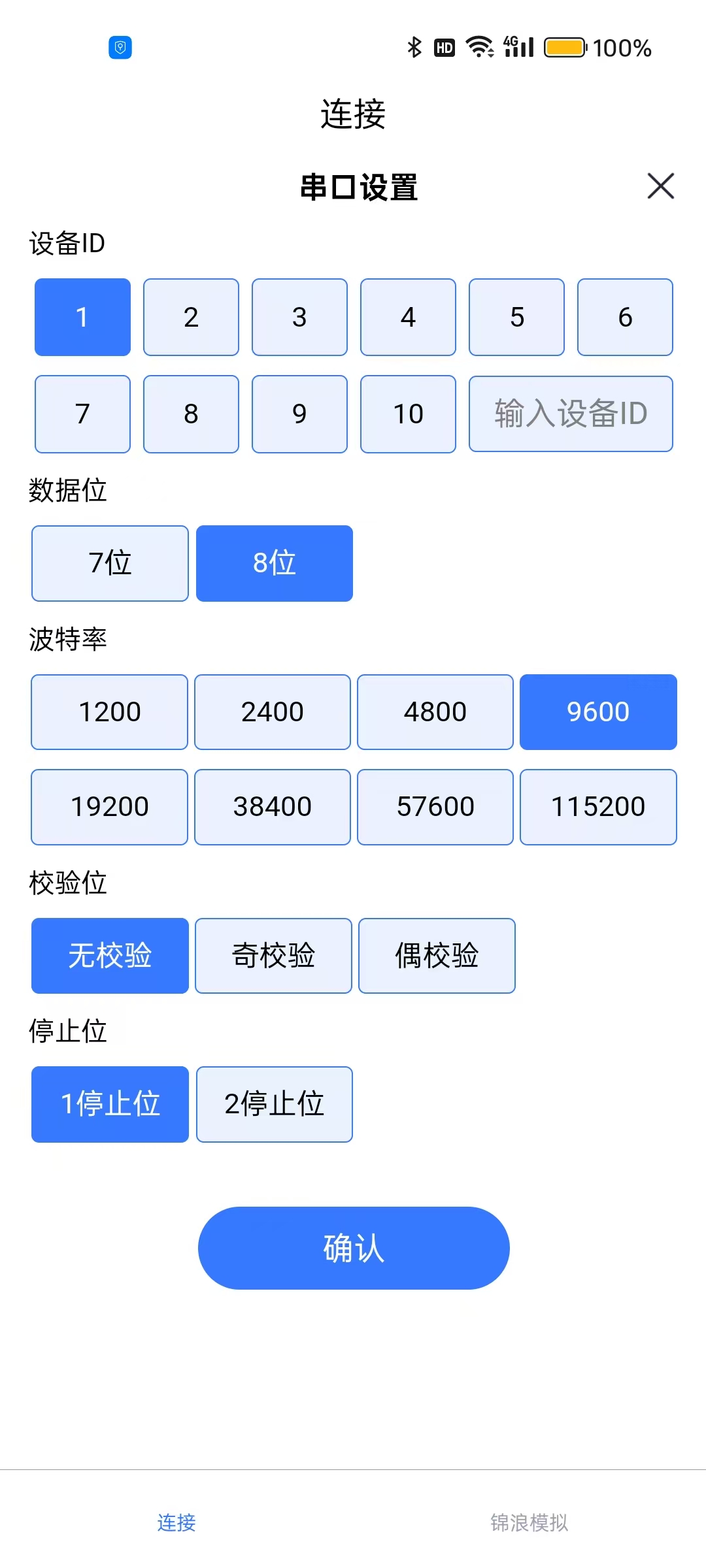
- Enable Bluetooth on the phone, open the app and scan/pair with the ED-N2-RS485 device;
- Match serial parameters with the four-capability master — baud rate, parity and the rest;
- Enable inverter slave simulation mode, configure slave address and registers, and preload basic info such as model, SN and firmware version.
Simulated data and state configuration
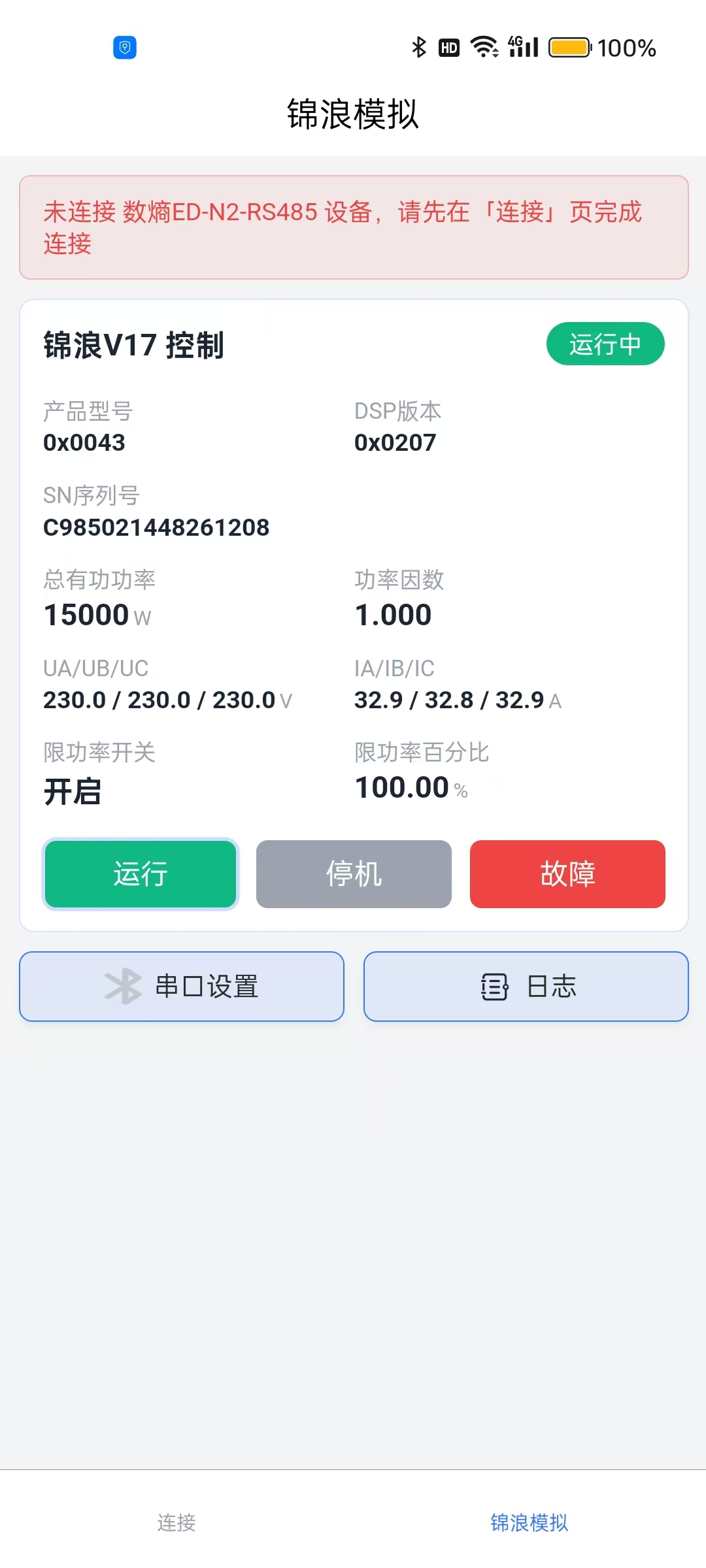
The secondary-development app covers the full range of inverter operating scenarios:
- Telemetry: simulate three-phase electrical values, power, power factor, device temperature and more, switching between fixed and floating values;
- Device states: freely switch among running, stopped, fault alarm, power-limited and other states;
- Parameter setpoint: honors master write commands, updating simulator register data in real time.
What value and use cases does this solution serve?
Joint commissioning without real inverters cuts prototype cost and schedule; repeated fault simulation and precise frame troubleshooting come standard. Fits PV/storage commissioning, protocol integration, training demos and secondary-development verification.
It significantly cuts commissioning cost and time for PV/storage projects, covering joint commissioning and acceptance, protocol integration, fault troubleshooting, training demos and secondary-development verification.
Core value
- Lower cost, faster, no real units: drop inverter-prototype dependency and start joint commissioning in early project phases, saving equipment cost and schedule;
- Safe and controllable, full scenarios: the virtual device repeats limit tests and fault simulations endlessly with no hardware-damage risk;
- Light and flexible, highly adaptable: long battery life, no PC needed — a phone finishes on-site commissioning;
- Extensible, secondary-development friendly: custom protocols and registers adapt to multi-brand inverter communication commissioning;
- Precise troubleshooting, better quality: complete frame records pinpoint communication issues, greatly raising commissioning accuracy.
Use cases
- Four-capability communication joint commissioning and acceptance for PV/storage projects;
- Modbus protocol integration for inverters, gateways and industrial-control platforms;
- Field bus stability checks and communication fault troubleshooting;
- Technical demos, project training and device-function simulation tests;
- Multi-model communication adaptation and secondary-development verification.
FAQ
Can the virtual inverter slave replace a real inverter prototype?
Yes. Built on edatahub ED-N2-RS485 secondary development, the phone app simulates an inverter Modbus slave on the RS485 bus and passes full-function checks with the four-capability master — data monitoring, parameter configuration, remote control — no real prototype needed.
Do I need to carry a PC and lots of cables on site?
No. The ED-N2 module has a built-in lithium battery with 48-hour standalone operation; the phone connects wirelessly over Bluetooth — no PC, no complex wiring, and one person completes on-site commissioning and parameter inspection.
Which inverter brands and protocols does it support?
The solution speaks standard Modbus RTU with custom registers and protocols, adapting to four-capability commissioning of multi-brand PV/storage inverters; it also generalizes to protocol-integration verification of other RS485 industrial devices.
Can simulated faults and edge cases be tested repeatedly?
Yes. The virtual slave switches freely among running, stopped, fault-alarm and power-limited states, and simulates floating telemetry such as three-phase values and power — no hardware-damage risk, so limit tests and protocol troubleshooting can repeat endlessly.